Build on every computer you own, from one.
farm sends the commit you're on to your own Windows PC, Mac or Linux box, runs your build there, and brings the .exe, .app or binary back home. No accounts, no CI server, no monthly bill. Just SSH and the computers you already have.
Install it, it's one lineor see how machines join
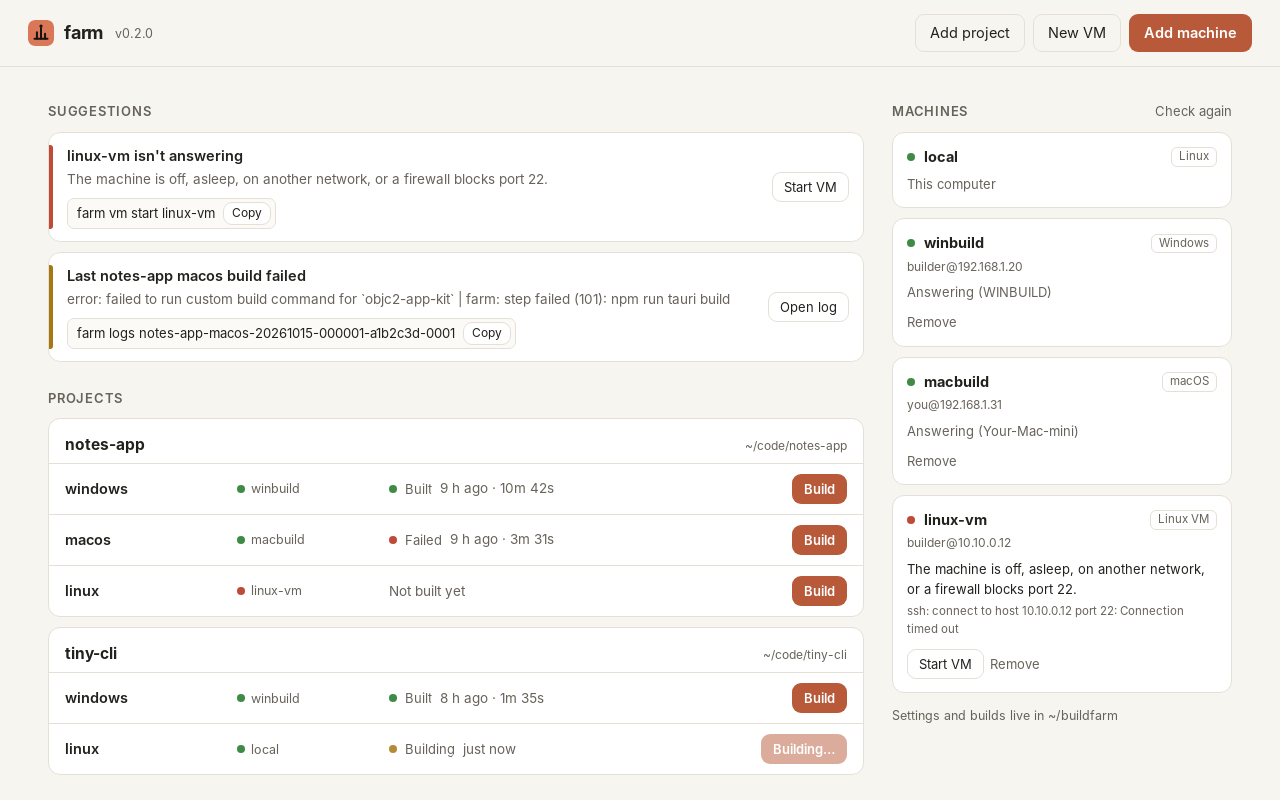
farm ui)put farm on your computer
The computer you work on runs farm. One line puts it in a buildfarm folder in your home folder.
It needs no administrator rights, and it checks the download against its SHA-256 before installing anything.
# in Terminal
curl -fsSL https://farm.kylesoft.com/install.sh | bash
Needs Python 3.8+, git and ssh. On a Mac that has never had Apple's command line tools, run xcode-select --install first. They include all three.
# in PowerShell (a normal window is fine)
irm https://farm.kylesoft.com/install.ps1 | iex
No Python on the PC? farm fetches a private copy from python.org (about 11 MB, checksum-verified) and keeps it in its own folder. Git comes from winget if it's missing.
Then run farm setup. It checks the computer, makes farm's SSH key and walks you through adding your first build machine.
Or run farm ui and do all of it in your browser.
Rather read it first? Download install.sh or install.ps1, or grab
farm-0.2.0.tar.gz and run bin/farm from wherever you unpack it.
Checksums: SHA256SUMS.
let the build machines in
Any Windows 10 or 11 PC, Mac or Linux machine your computer can reach, at home, at the office or as a VM.
Run farm add-host (or click Add machine in the app). It shows a line that already carries your farm key. Paste it on the build machine:
& ([scriptblock]::Create((irm https://farm.kylesoft.com/join.ps1))) -Key 'ssh-ed25519 AAAA… farm@yourpc'curl -fsSL https://farm.kylesoft.com/join.sh | bash -s -- --key 'ssh-ed25519 AAAA… farm@yourpc'- It turns on the machine's own SSH server: Windows' built-in OpenSSH, macOS Remote Login, or openssh-server on Linux.
- It lets in farm's key and only farm's key. On Windows it also turns SSH passwords off if it installed the SSH server itself.
- It installs git and makes a build folder, and asks before excluding that folder from Defender or turning off sleep.
- It prints the line to finish with on your computer, like
farm add-host pc --os windows --address 192.168.1.20 --user me
with the machine's SSH fingerprint. farm shows the fingerprint it sees, so you can check they match.
Builds that sign code read their certificates and passwords from the build machine's own keychain. Secrets never go in farm's files.
plant a VM if you're short one
No spare Mac or Linux box? farm vm create NAME shows you the plan, asks, then makes the VM, sets it up and adds it to farm.
- linuxincusUbuntu, on a Linux computersows itself
- linuxmultipassUbuntu, on Linux, macOS or Windowssows itself
- macOStartmacOS with Xcode, on an Apple Silicon Macsows itself
- windows 11by handincus, Hyper-V or UTM. You bring the ISO and licencestep by step
# Ubuntu: 4 CPUs, 8 GB memory, 60 GB disk
farm vm create linux-vm
# macOS with Xcode (Tart, Apple Silicon)
farm vm create mac-vm --os macos --disk 100
# Windows: prints the steps
farm vm create win-vm --os windows
make your Mac a farmhand
farm lite is a little menu bar app that turns a Mac into a build node. Open it, paste a pairing code, and the Mac joins your farm. Builds run as a hidden user that can't see your files, or inside a macOS or Linux VM when you want them fully walled off.
# on the Mac (macOS 13+, builds the app with Apple's command line tools)
curl -fsSL https://farm.kylesoft.com/farm-lite.sh | bash
# on your farm computer: make a pairing code, paste it into farm lite
farm node add kyles-mac
# optional: give builds a whole macOS or Linux VM on that Mac
farm node vm kyles-mac macos- It runs its own small SSH server for farm, separate from Remote Login, that only opens the hidden
farmbuildaccount with farm's key. - It reaches farm from anywhere through a Cloudflare tunnel (with Cloudflare Access in front), or on your local network or Tailscale with
--via local/--via tailscale. - Each build picks where it runs: host
kyles-mac(the hidden user),kyles-mac-macosorkyles-mac-linux(VMs, via Tart on Apple Silicon). - Pause, VMs, workspace cleanup, start at login and Leave farm are all in the menu. macOS asks for your password once, when it joins.
write down how to build it
In a git project, farm init writes a farm.toml with one target per system, pointed at the machines you have.
Each target says which machine, which commands, and which files to bring back.
[project]
name = "myapp"

[targets.windows]
host = "winbuild"                      # a machine from `farm hosts`
setup = ["powershell -File setup.ps1"] # toolchains; re-runs when changed
build = ["cargo build --release"]      # one command per line
artifacts = ["target/release/*.exe"]   # what to bring back

[targets.macos]
host = "macbuild"
build = ["cargo build --release"]
artifacts = ["target/release/myapp"]

[targets.linux]
host = "local"                         # this computer
build = ["cargo build --release"]
artifacts = ["target/release/myapp"]
Windows targets run in PowerShell, macOS and Linux in bash. Builds see FARM_JOB, FARM_COMMIT,
FARM_VERSION and anything you put in env = { … }.
bring in the harvest
farm builds the commit you're on (add --dirty for uncommitted changes). Each machine keeps a warm copy of the project,
so target/ and node_modules/ survive and the next build is quick. One build per machine at a time; the rest wait their turn.
$ farm build windows
farm: building myapp windows at 4f2a9c1 (v1.4.0) on winbuild
   Compiling myapp v1.4.0
    Finished `release` profile in 2m 41s
farm:   9b1e…c07d  myapp.exe
farm: succeeded in 3m02s
$ farm build macos -b   # in the background
myapp-macos-20261015-104412-4f2a9c1
$ ▌
The files land in ~/buildfarm/artifacts/ with a SHA256SUMS. farm logs -f follows a build,
farm artifacts lists the harvest, and farm publish runs your own upload script on the latest one.
check on everything
farm ui opens the farmhouse in your browser (that's the photo up top): every project with a Build button per target, live logs,
the built files, and your machines with whether they're answering. It also keeps a list of suggestions: what's broken or missing and the exact fix,
like a machine that went to sleep, a target pointing at a machine farm doesn't know, or the line where a build fell over.
- linux-vm isn't answeringit's off or asleep
- farm vm start linux-vmthe fix, one click
- ● answeringback to work
Prefer the terminal? farm doctor prints the same suggestions. The app only listens on your own computer
and needs the one-time key in the address farm opens, so nobody else can use it.
close the gate
- farm logs in to build machines with its own SSH key, made on your computer. The private half never leaves it.
- Each machine's identity is pinned the first time farm connects, so a different machine answering later is refused.
- The installers verify SHA-256 checksums before installing anything. farm talks only to your machines: no telemetry, no accounts.
- The app listens on 127.0.0.1 only and checks a random key on every request.
- Build machines run whatever your farm.toml says, as the user you joined with. Use machines and accounts that are just for building where you can.
the feed store receipt
Everything farm does, on one slip.
- farm setupfirst-run check, key, first machine
- farm ui · farm doctorthe app · suggestions
- farm add-host · remove-hostmachines in and out
- farm hostswho's answering
- farm vm create · start · stop · deleteVMs on this computer
- farm inita farm.toml for this project
- farm build TARGET -b --dirtybuild (in the background)
- farm status · logs -f · waitkeep an eye on it
- farm artifacts · prunethe harvest · tidy up
- farm publish · shell · cleanship it · log in · start fresh
- accounts, servers, telemetrynone, ever
things people ask
- Do I need a server or a CI service?
- No. The computer you work on drives everything over SSH, and builds happen on machines you already own.
- Which computer should run farm?
- The one you write code on: Linux, macOS or Windows all work. It can build on itself too, as the machine called
local. - Can I build iPhone and Mac apps?
- Yes, on a Mac with Xcode: a real one you join, or a macOS VM farm plants with Tart on Apple Silicon.
- Does farm send anything anywhere?
- Only your project, to your own machines. No telemetry, no update check, no account.
- How do I update it?
- Run the install line again. Your machines, builds and settings stay put.
- How do I remove it?
- Delete the
buildfarmfolder,~/.local/bin/farm(on Windows, takebuildfarm\binout of PATH) and~/.ssh/farm_ed25519*. On a build machine, delete farm's line fromauthorized_keysand thefarmfolder. - Why chickens?
- Every farm needs some, and they're very good at watching builds. (If you spotted anyone else up top, no you didn't.)